How to configure the remote authentication (windows server as the Radius) for the GUI login.
- 0 Followed
- 0Collected ,1482Browsed

Network Topology
Null
Problem Description
The customer want to set the AAA for the GUI login.
Process Analysis
It shows the following debugging information for the radius:
*Jun 1 10:55:38:022 2023 secpath RADIUS/7/EVENT:
Decoded reply packet successfully.
*Jun 1 10:55:38:022 2023 secpath RADIUS/7/PACKET:
H3c-User-Roles="network-admin"
Service-Type=Login-User
Framed-IP-Address=10.X.X.X
Class=0x9351077300000137000102000ac9674c0000000025b1a357089b176501d9901b018046150000000000000061
Microsoft-Attr-14=0x00000032
Microsoft-Attr-15=0x00000078
*Jun 1 10:55:38:022 2023 secpath RADIUS/7/PACKET:
02 1e 00 7b 9b 8d 95 be 90 6b cd dd a7 46 3c af
36 56 61 13 1a 15 00 00 63 a2 9b 0f 6e 65 74 77
6f 72 6b 2d 61 64 6d 69 6e 06 06 00 00 00 01 08
...
*Jun 1 10:55:38:022 2023 secpath RADIUS/7/EVENT:
Sent reply message successfully.
*Jun 1 10:55:38:023 2023 secpath RADIUS/7/EVENT:
PAM_RADIUS: Processing RADIUS authentication.
*Jun 1 10:55:38:023 2023 secpath RADIUS/7/EVENT:
PAM_RADIUS: Fetched authentication reply-data successfully, resultCode: 0
*Jun 1 10:55:38:023 2023 secpath RADIUS/7/EVENT:
PAM_RADIUS: Processing RADIUS authorization.
*Jun 1 10:55:38:024 2023 secpath RADIUS/7/EVENT:
PAM_RADIUS: RADIUS Authorization successfully.
It have been find the radius auth and autorization passed, when the GUI login shows failed.
We did the packets capture for the H3C IMC as radius server. The setting on the IMC is as following:
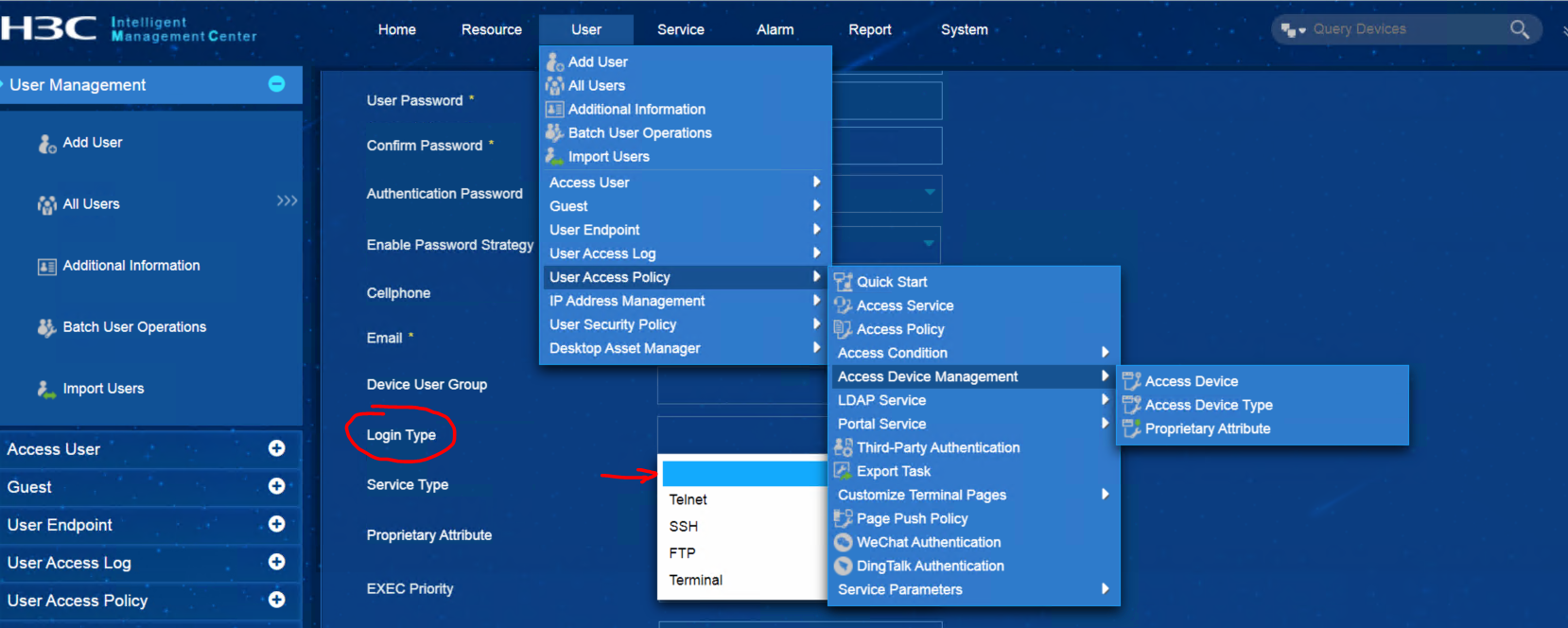
For the Login type in the user parameter have been selected as empty.
And the radius packets is as following:
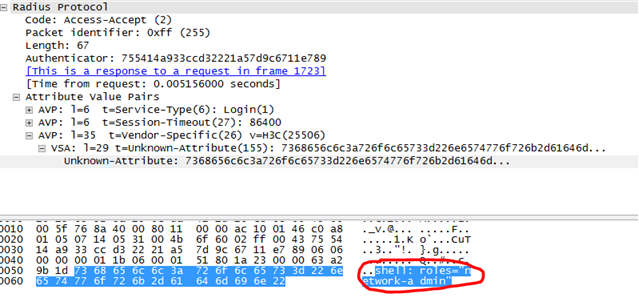
And the debug info on the device is as following:
*Jun 2 09:43:42:170 2023 XXX RADIUS/7/PACKET:
Service-Type=Login-User
Session-Timeout=86400
H3c-User-Roles="shell:roles="network-admin""
Solution
If the radius server was using the windows server or other vendor of Radius server for GUI login, One need set the vendor-specific attr, select the '3Com' or input the vendor code: 25506.
And create the vendor attr 155 with string value ‘shell:roles="network-admin"’