In UIS hyper-converged scenario with LSI RAID controller, given drive letters, how to acknowledge the actual physical slot of the faulty drive
- 0 Followed
- 0Collected ,1228Browsed

Network Topology
UIS hyper-convergence
Problem Description
Various conditions such as slow drive, bad sectors, or severe wear on SSDs may require drive replacement without triggering a fault indicator.
In actual operations, situations may arise where only the partition letter of a faulty drive is displayed, making it impossible to correlate with the physical slot. Server engineers cannot acknowledge which drive needs replacement if the fault indicator is not lit.
Process Analysis
Generally, if the SN serial number of the drive can be acknowledged, the server side can acknowledge the physical slot information of the server through the drive appearance or the drive information on the out-of-band (OOB) page. Therefore, acknowledging the drive serial number is generally equivalent to acknowledging the physical slot.
The following introduces two methods to acknowledge the drive serial number.
1. The new version of UIS already supports displaying the drive serial number directly in the foreground.

2. If the serial number cannot be acknowledged in the foreground, but the drive letter is known, you can follow the steps below to view the corresponding serial number using the RAID controller tool in the background.
(1)Based on the actual situation, acknowledge the faulty drive letter
(2)Execute lsscsi, the third digit in the 4 digits within the square brackets is the Logical Device Number, and the final /dev/sdx indicates the corresponding drive letter of this logical array in the system.
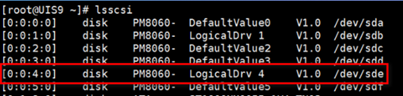
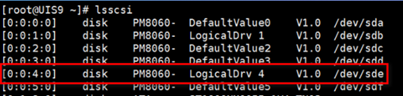
As shown in the query, the drive letter sde in the operating system corresponds to a Logical Device Number of 4 for its logical array.
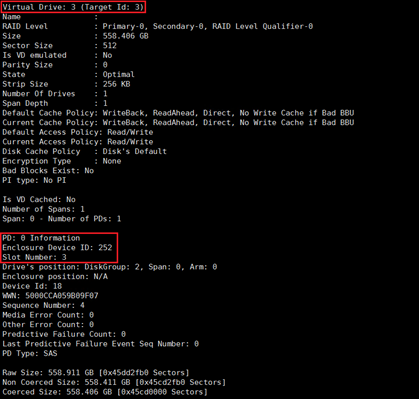
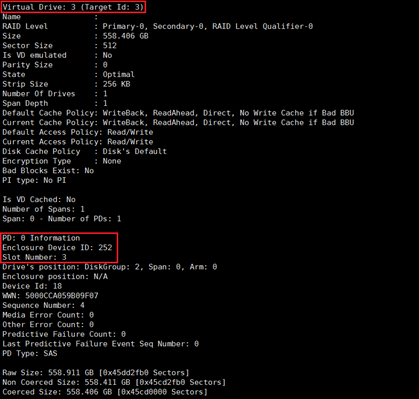
(3) Execute megacli LDPDinfo -a0 (0 is the RAID controller number), find the Enclosure and Slot number of the drive corresponding to the Logical Device Number. As shown in the figure, the drive with Virtual Drive 3 corresponds to Enclosure 252, Slot 3.
(4)/opt/MegaRAID/storcli/storcli64.bak /c0/eX/sY show all | grep SN
X is the Enclosure number Y is the Slot number
As shown below, SN = WSD2QTHJ

Solution
After acknowledging the drive SN using the above method, verify the physical appearance or check the drive serial number on the out-of-band (OOB) page to confirm the actual physical slot of the faulty drive.