H3C switch connecting to Ruijie switch triggers STP dispute, causing service interruption.
- STP
- VLAN
- S6300/S6520/S6525/S6550/S6800/S6900 Series
- S5100S-D/S5110V2/S5120V2/S5120V3/S5130/S5150 Series
- 0 Followed
- 0Collected ,1756Browsed

Network Topology
Customer network:
Dual-core VRRP+MSTP networking, binding different instances for load sharing, with services acting as mutual primary/backup and root bridges serving as mutual primary/backup.
Uplink VRRP integrates track+BFD to achieve switchover between primary/backup and fast convergence of routes.
Divided into office service core and smart service core; core models differ.
Aggregation layer uses 6520X-30QC-EI switches, with downstream connections to Ruijie access switches from another vendor.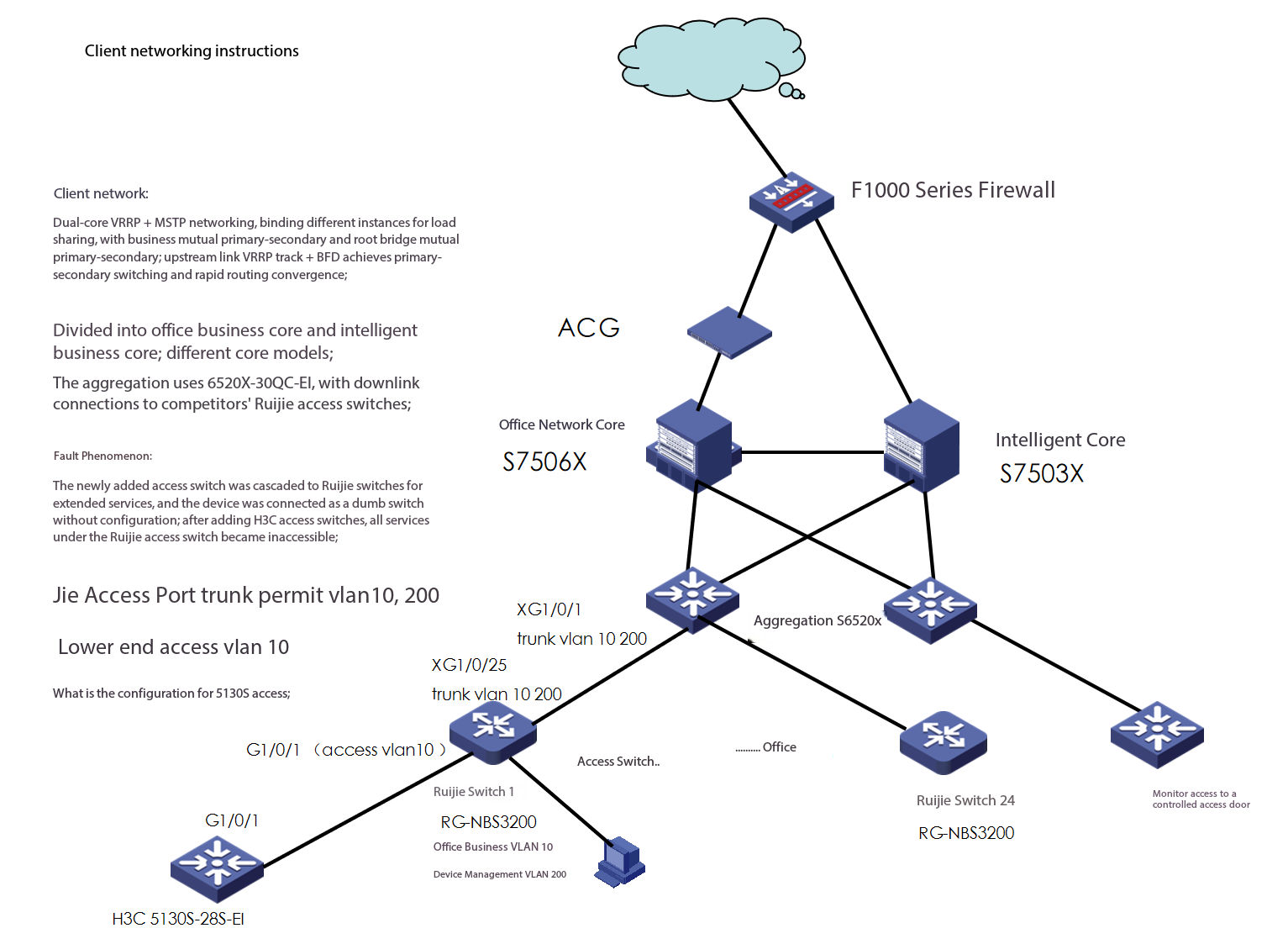
Problem Description
Fault phenomenon:
Newly added access switches cascading to Ruijie switch for business expansion, devices connected as unmanaged switches without configuration; after adding H3C access switches, all services under the Ruijie access switch became unavailable.
Ruijie access switch uplink port configured as trunk permit vlan10, 200
Downlink port access vlan 10
H3C 5130s access has no configuration.
Process Analysis
Customer request:
Access H3C access switch, service is up; the switch is used as a dumb device without configuration;
After receiving the customer request, assisted with remote checking;
1. Ruijie access switch management VLAN 200 is also down, unable to perform remote management; checked the aggregation side interconnection port;
Suspected fiber link (OFL) or port issue;
dis lldp ne l to check neighbor information, acknowledge interconnection port;
dis int brief to check interconnection port status, up, status normal;
dis tran dia int to check optical transmission, found both normal;
On-site, the customer conducted cross-testing on the fiber optic and modules of the link. Connecting the fiber optic from Ruijie access switch 1 to switch 2 showed normal communication.
Connecting the fiber link from switch 1 to switch 2 revealed that the issue persisted.
2. Suspected an issue with the Ruijie device. Asked the customer to perform a local login and check, but no abnormalities were found. Also inquired with the customer; no configuration changes or other modifications were made.
3. Suspected a loop or STP blockage in the downstream devices.
Continue checking the interconnection ports on the aggregation switch and found no MAC address learned.
dis mac-ad int g1/0/1
Continue checking the STP status
dis stp instance 1 brief
dis stp brief
Confirmed that the root port and alternate port are normal, and the blocked port has no issues.
Carefully checked and found that the interconnection port between the aggregation and Ruijie access device is in discarding state; this port is the designated port.
Identified the cause of the fault.
display stp abnormal-port
Discovered that triggering dispute caused the designated port to block and enter discarding state.
5. It was learned that Ruijie switches have STP disabled by default out of the factory, with loop detection enabled; while newly added H3C access switches have STP enabled by default. The upstream device received low-precedence BPDUs sent by the downstream device, but the downstream device did not receive high-precedence BPDUs sent by the upstream device, triggering BPDU unidirectional transmission, resulting in port blocking.
==
The low-precedence BPDU packets sent by the H3C 5130s access switch will be tagged with PVID 10 when entering the downstream interface G1/0/1 of the Ruijie switch. They are then transparently transmitted to the aggregation layer through the uplink port XG1/0/25. However, the high-precedence BPDUs sent by the aggregation layer will be tagged with the default interface PVID 1 after entering the Ruijie XG1/0/25, causing the 5130s to fail to receive the high-precedence BPDUs.
6. Dispute is a feature of H3C switches.
The Dispute mechanism is enabled by default on all ports. When a port receives a BPDU packet that carries the designated port role and Learning/Forwarding state, and the precedence vector in the packet is lower than the Rx ports precedence vector, the Dispute mechanism takes effect. The port that receives the packet is set to the Discarding state to prevent network loop formation.
Different vendors may handle STP protocol packets similarly or differently.
For H3C devices
When STP function is globally enabled on the switch, the received BPDU datagrams are sent to the processor as protocol packets. This process is not affected by port vlan tag.
When STP function is globally disabled on the switch, the received BPDU datagrams are forwarded as ordinary datagrams. Specifically, upon receiving BPDU datagrams, VLAN tags are added based on configuration, and during forwarding, VLAN tag removal and VLAN checks are performed.
Solution
Once the problem is identified, solving it is straightforward;
Resolving dispute issues:
1. In specific cases, you can configure the undo stp dispute-protection command to disable the Dispute protection function, but disabling it is generally not recommended,
2. Before bringing the device online, check the STP configuration of related devices in the network to avoid triggering the Dispute mechanism;
3. Resolve the issue of BPDU unidirectional transmission;
If all devices in the network are H3C devices, it is recommended to enable stp globally; STP protocol packets are directly sent to the processor for processing and are not affected by port VLAN tags;
The issue involves a third-party device and no configuration changes were made to the third-party device.
Instructed the user to disable STP on the uplink port of the newly connected 5130s switch. Issue resolved.