After configuring ROCE on a certain site's S6850-56HF, sporadic rate drops to 0 occur when traffic is sent from server ports 1 and 2 to ports 7 and 8
- ACL
- Tacacs
- Ethernet interface
- Configuration optimization
- Product Features
- Software problem
- S9500 Series
- S6300/S6520/S6525/S6550/S6800/S6900 Series
- 0 Followed
- 0Collected ,1776Browsed

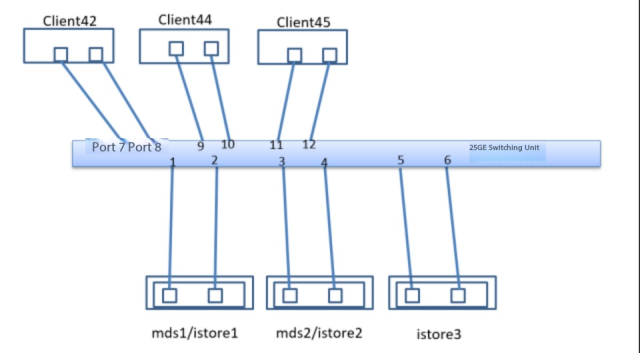
Network Topology
Problem Description
After configuring ROCE on a certain site"s S6850-56HF, sporadic rate drops to zero or failure to achieve the expected rate occurs when traffic is sent from server ports 1 and 2 to ports 7 and 8.
Process Analysis
1. After clearing the packet loss count on the interface at the time of failure, execute the corresponding packet loss command again to check the packet loss count. It was found that the increase in WRED count indicates that traffic was directed to other queues where ECN was not enabled.

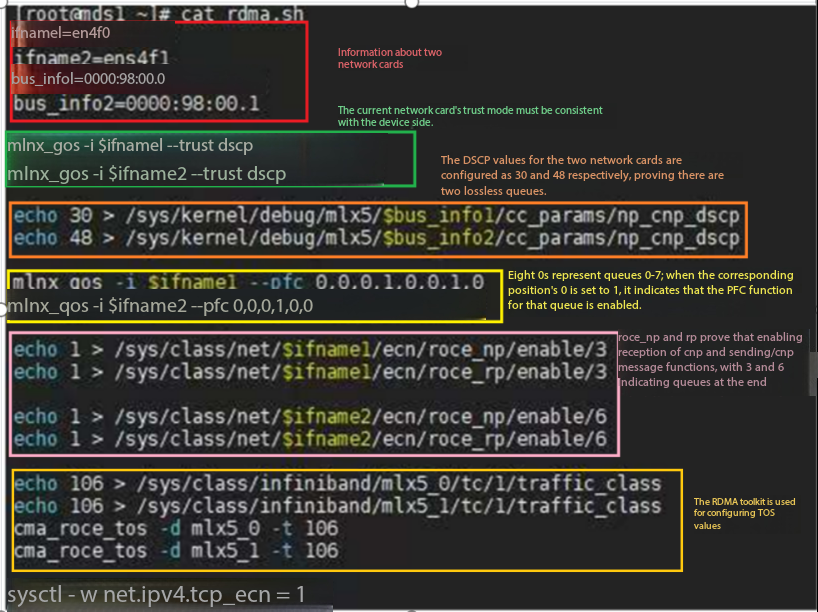
2. Check that the currently enabled ECN queues are queue 3 and queue 6. It is suspected that the current service traffic was directed to other queues.

3、When executing display qos queue-statis interface xxx outbound under the interface, it was found that the packets in queue 0 increased significantly, indicating an issue with the DSCP value on the server side, which caused abnormal mapping to the device queue. Additionally, traffic statistics can be matched by DSCP value under the device interface (the interface and NIC trust mode is DSCP) to rule out faults on our device side.

4. Check whether PFC or ECN function is enabled on the device side by using the corresponding command. For most server-side PFC and ECN configurations, the settings are as follows. Therefore, for some common server ROCE failures, we can independently verify whether the server-side dscp value and the NIC ECN and PFC functions are correctly enabled.
Solution
The issue was resolved after correctly enabling the corresponding queue on the server network card