Analysis of AP timing disconnection issue at a certain site
- 0 Followed
- 0Collected ,2668Browsed

Network Topology
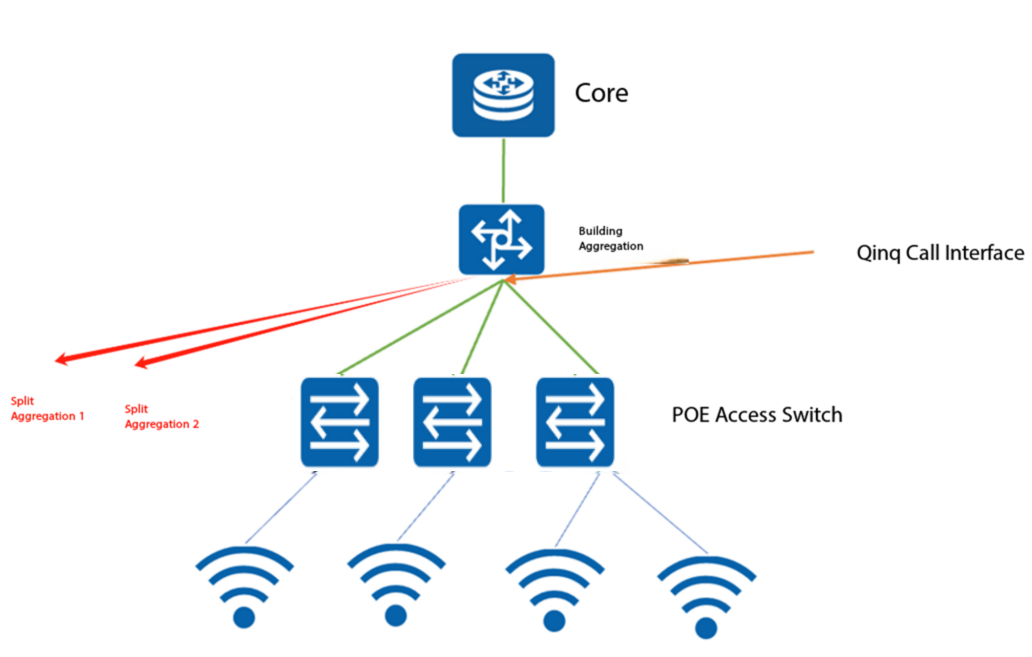
Problem Description
The customer has newly established wireless services in two buildings, corresponding to two aggregation switches A and B. After the services went live, it was found that APs in both buildings would go offline at irregular timing and could reconnect on their own. This issue occurs three to four times a day and is relatively frequent.
Process Analysis
1. Check AC and AP diagnostics, no abnormalities were found on the device. Investigate the reasons for AP offline, all showing Processed join request in Run state and Failed to retransmit message. Seeing these two offline reasons justifies suspicion of link issues. Subsequently, check the ap-diag file on the AP, and indeed there are packet loss records.

2, thus the decision was a link issue, so the customer was asked to check the physical link. After two days of troubleshooting, no physical link problem was found. The customer tried many methods without success, and the APs still dropped offline as before. However, frontline feedback indicated the issue occurred after configuring QinQ on the aggregation switch. The frontline engineer removed the QinQ configuration on aggregation B and compared the AP status under both aggregations. After two days of operation, APs under aggregation B remained stable online with no dropouts, while aggregation A continued to experience random timing dropouts as before.
3. After the above investigation, it was determined that the issue was caused by the qinq configuration. Therefore, the corresponding switch production line was consulted. The switch team clearly stated that the qinq configuration would not cause link issues—data passes through the switch as it comes, with only the addition or removal of outer VLAN tags. The size of the tagged packet would increase by 4 bytes due to the outer VLAN tag. At this point, there were no further leads to pursue.
4. Check the content of ap-diag, which shows that large packets fail to pass. Testing reveals that ping test packets larger than 1468 bytes fail. Could this be the reason for the AP going offline? By analyzing the mirrored packets from the AP uplink switch, it is determined that the AP online status depends on CAPWAP management frames. Even if data frames fail, the AP will not go offline. Multiple packet captures show that when the AP is online, the keepalive packets maintaining its online status do not exceed 100 bytes, ruling out this issue. Thus, the content of ap-diag has little practical reference value, and the initial troubleshooting approach was incorrect.
5. Finally, during the high-incidence period around 9 AM, packet capture analysis was conducted on both the uplink and downlink ports of the aggregation switch. During the capture period, an AP went offline, and the keep-alive packets before the disconnection were immediately analyzed.

Here, it can be observed that the Response message replied by the AC carries an outer VLAN tag of 1, while the inner VLAN is not visible in a normal packet capture. Comparing it with a normal message, the outer VLAN tag should be 1298. At this point, the root cause of the issue has finally been identified. The switch side stated that it forwards the data as received. Now, the focus is on analyzing why the core switch changed the tag to 1 before sending it to the aggregation switch. Since the core switch is a third-party device, the investigation of this VLAN tag issue will be handled by the third-party vendor.
Solution
The final conclusion from the partner was that an unknown source host was infected, and the virus-infected host frequently scanned other ports such as 9100 on the AP. The scanning action triggered a code bug in the partner"s device, causing the core switch to set the inner VLAN ID replied to the AP to 0. When forwarded to the aggregation layer, the inner tag was set to 1, resulting in timeout of the keepalive packets between the AP and AC, which led to the AP going offline.