Technical Announcement on the Firmware Downgrade Issue of Intel X710DA4 Network Card
- 0 Followed
- 0Collected ,3753Browsed

Product Model
|
Announcement category |
Early warning |
|
Operational requirements |
Learning prevention, Security hardening |
I.
The NIC-X710DA4-F-B-10Gb-4P network card with the model barcode suffix "G2P5".
The confirmation method is as follows:
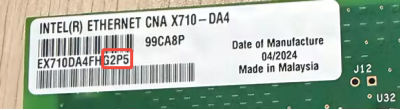
Involved Version
All currently released firmware versions (the latest one so far is 9.53)
Problem Description
The NIC-X710DA4-F-B-10Gb-4P network card cannot be directly downgraded using the downgrade package from Intel's official website, reporting a downgrade failure.
Cause Analysis
Intel upgraded the NIC-X710DA4-F-B-10Gb-4P network card, causing the firmware already released on Intel's website to fail to recognize the new device information during downgrade, thus resulting in firmware downgrade failure.
Workaround/Solutions
1.
After confirmation with Intel, if customers need to downgrade the firmware, they can download the firmware downgrade package from Intel's official website and then comment out the function line for verifying new device information in the CFG file. The method is as follows:
Open the CFG file in the firmware package and search for the field named "X710DA4FH_xxxx_CFGID7p2_OEMGEN_OO.bin" (where xxxx represents the version bit; for example, 9.53 corresponds to 9p53). Add a ";" before its corresponding PBA number (a semicolon indicates a comment).
After completing the editing, the downgrade process can skip the PBA number verification and proceed with the firmware downgrade normally.
2.
Intel plans to cancel the PBA verification configuration in the future, and future firmware versions will resolve this issue.