Technical Announcement on the Impact of the 2026.8.22 Expiration of EIA Built-in Certificates and Countermeasures
- 0 Followed
- 0Collected ,662Browsed

Product Model
|
Announcement category |
Mandatory Immediate Rectification |
|
Operational requirements |
Patch upgrade |
(1) AD-Campus EIA
(2) iMC EIA
(3) iMC SDNAPP EIA
Involved Version
All versions
Problem Description
The original server certificate built in EIA will expire on August 22, 2026. After the certificate expires, the certificate authentication business using the built-in certificate will be affected.
The method to confirm whether the site uses the H3C built-in certificate is as follows:
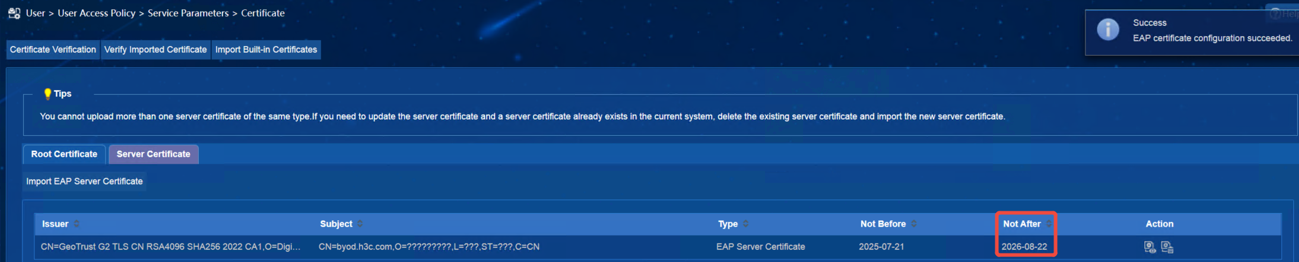
Enter the product certificate configuration page to check whether the certificate expiration time is 2025-08-19 and whether the subject is CN=byod.h3c.com,O=新华三技术有限公司,L=杭州市,ST=浙江省,C=CN.
(1) iMC EIA view screenshot:
(2) AD-Campus EIA view screenshot. The menu location varies between versions and is subject to the on-site environment:
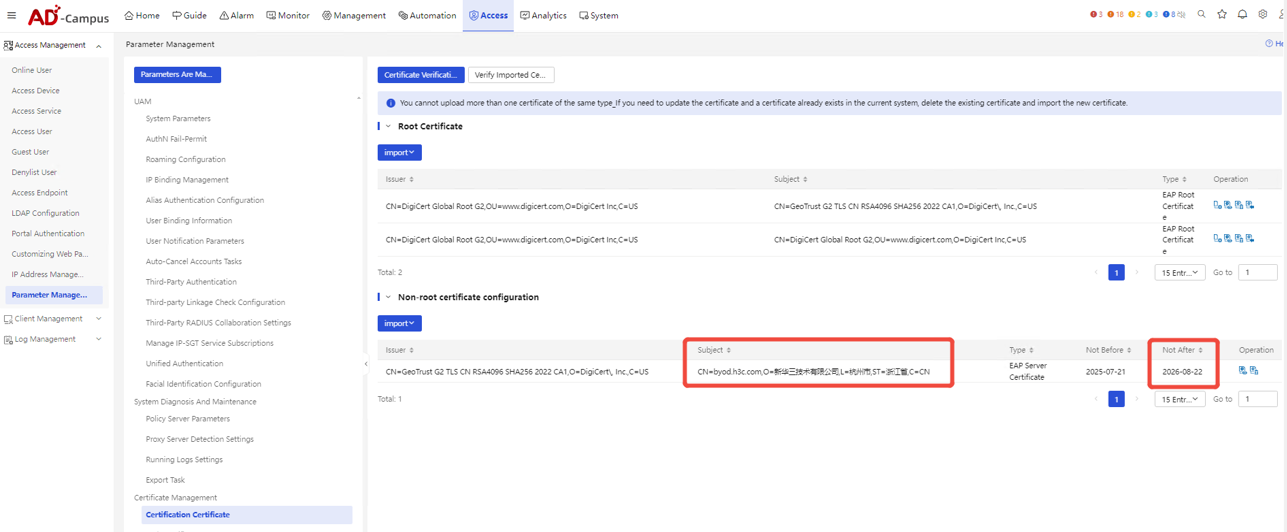
If the subject and expiration time are as shown in the figure above, it means that the customer uses the H3C built-in certificate.
Cause Analysis
The built-in certificate validity period expires.
Workaround/Solutions
We offer two options for customers to choose from: commercial certificate and self issued certificate. The differences between the two are as follows:
1. Business certificate
Issued by a trusted public certificate authority, it is automatically trusted by operating systems, browsers, and Radius clients (such as Windows, macOS, and mobile devices), with no additional configuration required on the terminal side and simple replacement steps. However, since 2020, the International Certificate Authority and Browser Consortium have mandated that all publicly trusted TLS/SSL certificates must have a maximum validity period of 13 months. The business certificate issued this time is only valid for 200 days.
2. Self issued certificate
Generated by H3C without third-party CA endorsement, with a custom validity period of 30 years. But the certificate is not trusted by the client by default, and the root certificate needs to be manually imported into the client or server trust repository. For cases where the verification server certificate is selected on the client side, it is necessary to import the root certificate on the terminal. Certificate replacement involves terminal side operations and the steps are relatively cumbersome.
The methods for obtaining and replacing commercial certificates refer to Attachment 1 "Guidelines for Importing Commercial Certificates" (2026). The method for obtaining and replacing self issued certificates can be found in Attachment 2, "Guidelines for Importing Self Issued Certificates".