Technical Announcement on Cache Defaulting to Disabled After Array Creation via Low-Version HDM on H3C Uniserver Servers
- 0 Followed
- 0Collected ,5Browsed

Product Model
|
Announcement category |
Early Warning |
|
Operational requirements |
Learn prevention, Version Upgrade |
H3C G5, G6, and G7 server models (excluding PKG models)
Involved Version
The affected versions for each model are as follows:
|
Linkdata RAID controller |
LSI storage controller |
PMC RAID controller |
|
|
G5 models |
Versions earlier than HDM_6.27 (excluding) |
N/A |
N/A |
|
G6 models |
Versions earlier than HDM2_2.35 (excluding) |
Versions earlier than HDM2_2.35 (excluding) |
N/A |
|
G7 models |
Versions earlier than HDM3_3.12 (excluding) |
Versions earlier than HDM3_3.12 (excluding) |
N/A |
Problem Description
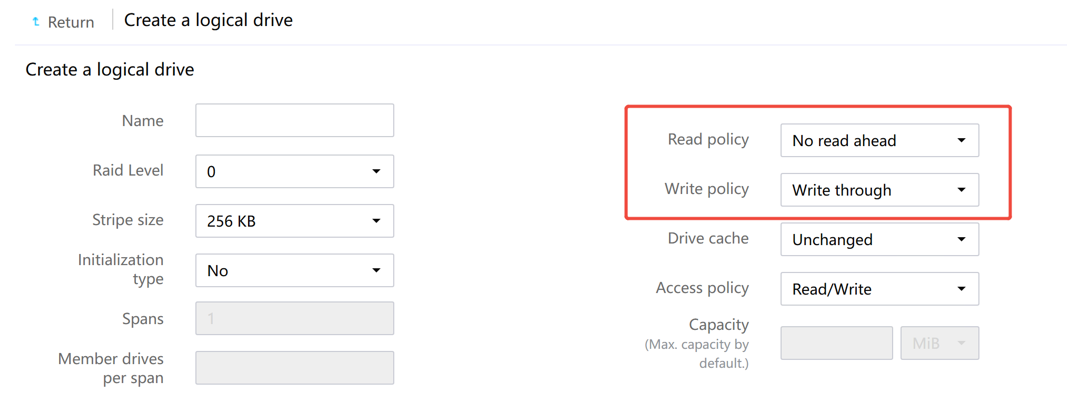
When creating a RAID array on the HDM page with a supercapacitor configured, the cache mode preference remains at cache disabled, i.e., the default read policy is No Read Ahead and the default write policy is Write Through, as shown in the figure below:
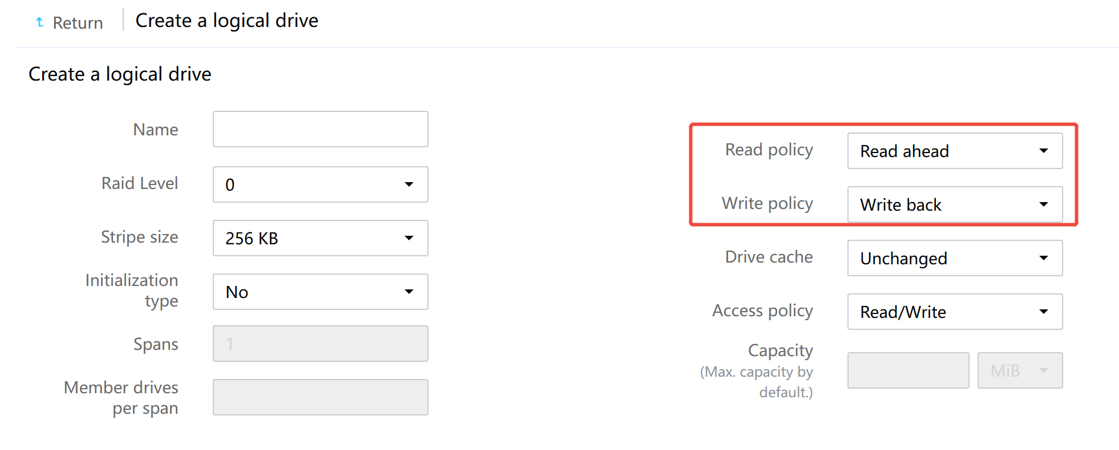
To enable cache mode, customers must manually change the default read policy to Read Ahead and the default write policy to Write Back, as shown in the figure below:
Cause Analysis
Some customers currently need to enable cache for performance tuning. To improve operational convenience, HDM now sets the cache mode preference to cache enabled by default, eliminating the need for manual modification.
Workaround/Solutions
Workaround
For the affected HDM versions listed above, when creating a RAID array on the HDM page, you can enable cache by manually changing the default read policy to Read Ahead and the default write policy to Write Back.
Solution
After upgrading HDM to one of the versions listed below, cache will be enabled by default when creating a RAID array on the HDM page, without the need to manually adjust the cache policy.
|
|
Linkdata RAID controller |
LSI storage controller |
PMC RAID controller |
|
G5 models |
HDM 6.27 and later |
N/A |
N/A |
|
G6 models |
HDM2 2.35 and later |
HDM2 2.35 and later |
N/A |
|
G7 models |
HDM3 3.12 and later |
HDM3 3.12 and later |
N/A |