
Network Topology
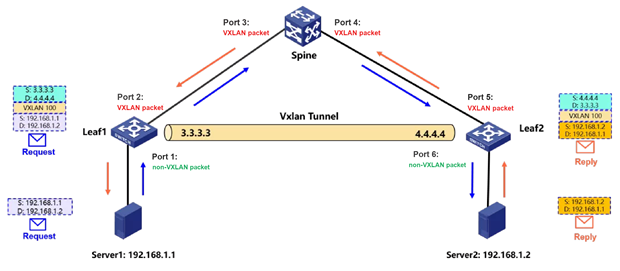
With VXLAN now widely deployed, the network looks quite different from a traditional one, and counting VXLAN traffic has gradually become an essential skill for anyone who works on networks.
Let us first look at how packets are encapsulated and forwarded in a VXLAN network. In the figure above, Leaf 1 and Leaf 2 are each connected to the Spine and form a VXLAN tunnel by advertising EVPN routes; the tunnel addresses are 3.3.3.3 and 4.4.4.4 respectively.
When Server 1 (IP = 192.168.1.1) pings Server 2 (IP = 192.168.1.2), Server 1 sends an ordinary ICMP Request. The packet enters Leaf 1 on port 1, where the VXLAN header and the outer IP header are added; it then leaves from port 2, enters the Spine on port 3, and the Spine forwards it out of port 4 according to the outer IP information. The packet enters Leaf 2 on port 5, Leaf 2 removes the VXLAN encapsulation and sends the packet to Server 2 from port 6. The return traffic follows the same path. Two ways of counting VXLAN traffic are summarized below:
• Marking the DSCP value of the packet
• Matching the inner IP address of the VXLAN packet
Configuration Steps
1. Marking the DSCP Value of the Packet
- Port 1: once the traffic enters port 1, QoS can account it and at the same time re-mark its DSCP. Every port the traffic passes afterwards can then keep counting it simply by matching that DSCP:
Step 1: Define an ACL that matches ICMP traffic in one direction (a Request packet in this example)
acl advanced 3010
rule 0 permit icmp source 192.168.1.1 0 destination 192.168.1.2 0
Step 2: Define a class that matches the ACL with accounting, and mark the ICMP packets with DSCP 41
traffic classifier vxlan operator and
if-match acl 3010
traffic behavior vxlan
accounting packet
remark dscp 41
Step 3: Define a QoS policy that associates the class and the action
qos policy vxlan
classifier vxlan behavior vxlan
Step 4: Apply the QoS policy to the right interface and direction
interface GigabitEthernet 1/0/1
qos apply policy vxlan inbound
- Ports 2, 3, 4, 5 and 6: traffic can be counted directly by matching the DSCP, and the QoS definitions are the same:
Step 1: Define a class that matches packets with DSCP 41, plus the accounting action
traffic classifier vxlan-1 operator and
if-match dscp 41
traffic behavior vxlan-1
accounting packet
Step 2: Define a QoS policy that associates the class and the action
qos policy vxlan-1
classifier vxlan-1 behavior vxlan-1
Step 3: Apply the QoS policy to the right interfaces and directions
interface GigabitEthernet 1/0/2
qos apply policy vxlan-1 outbound
interface GigabitEthernet 1/0/3
qos apply policy vxlan-1 inbound
interface GigabitEthernet 1/0/4
qos apply policy vxlan-1 outbound
interface GigabitEthernet 1/0/5
qos apply policy vxlan-1 inbound
interface GigabitEthernet 1/0/6
qos apply policy vxlan-1 outbound
- Port 1: port 1 can use MQC accounting and match the source and destination IP addresses directly:
Step 1: Define an ACL that matches traffic in one direction
acl advanced 3010
rule 0 permit icmp source 192.168.1.1 0 destination 192.168.1.2 0
Step 2: Define a class that matches the ACL with accounting, plus the QoS policy
traffic classifier vxlan
if-match acl 3010
traffic behavior vxlan
accounting packet
qos policy vxlan
classifier vxlan behavior vxlan
Step 3: Apply the QoS policy to the right interface and direction
interface GigabitEthernet 1/0/1
qos apply policy vxlan inbound
- Port 2: when the packet leaves port 2 it already carries the VXLAN encapsulation, and the outbound direction does not support counting on inner-header information. Accounting would then have to rely on qos-local-id marking, which is fairly complex to configure, so it is recommended to count the traffic in the inbound direction of port 3 on the interconnecting link.
- Port 3: port 3 can count the traffic by matching the inner packet information. Define ACL 3011 to match both the outer and the inner information of the VXLAN packet, and apply the QoS policy to the inbound direction of the port:
Step 1: Define an ACL that matches traffic in one direction
acl advanced 3011
rule 0 permit vxlan source 3.3.3.3 0 destination 4.4.4.4 0 inner-protocol icmp
inner-source 192.168.1.1 0 inner-destination 192.168.1.2 0
Step 2: Define a class that matches the ACL with accounting, plus the QoS policy
traffic classifier vxlan
if-match acl 3011
traffic behavior vxlan
accounting packet
qos policy vxlan
classifier vxlan behavior vxlan
Step 3: Apply the QoS policy to the right interface and direction
interface GigabitEthernet 1/0/3
qos apply policy vxlan inbound
- Port 4: on a device that only forwards VXLAN traffic, the packet leaves port 4 still carrying the VXLAN encapsulation. Because the outbound port does not support matching inner-header information, accounting would again need qos-local-id marking, which is fairly complex to configure, so it is recommended to count the traffic in the inbound direction of port 5 on the interconnecting link.
- Ports 5 and 6: incoming packets on port 5 are de-encapsulated from VXLAN before they are counted, so on ports 5 and 6 the traffic can be counted directly from the inner information:
Step 1: Define an ACL that matches traffic in one direction
acl advanced 3012
rule 0 permit icmp source 192.168.1.1 0 destination 192.168.1.2 0
Step 2: Define a class that matches the ACL with accounting, plus the QoS policy
traffic classifier vxlan
if-match acl 3012
traffic behavior vxlan
accounting packet
qos policy vxlan
classifier vxlan behavior vxlan
Step 3: Apply the QoS policy to the right interfaces and directions
interface GigabitEthernet 1/0/5
qos apply policy vxlan inbound
interface GigabitEthernet 1/0/6
qos apply policy vxlan outbound
Key Configuration
Need to pay attention to where the traffic is going.