Layer 2 Remote Port Mirroring-Egress Port Mode
- 0 Followed
- 0Collected ,1Browsed

Network Topology
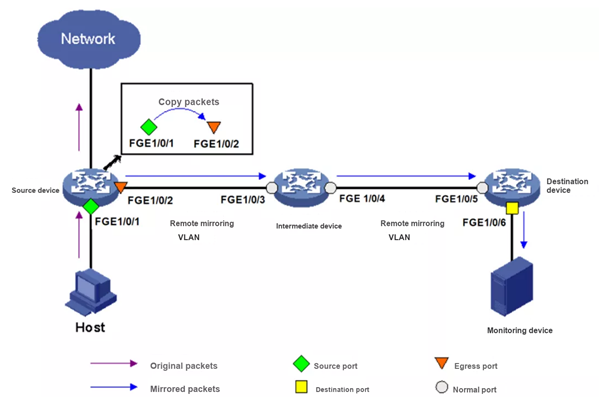
In this mode the source device copies the packets that enter the mirroring source to the egress port, and the egress port forwards the mirrored packet to an intermediate device. The intermediate device broadcasts it in the remote mirroring VLAN, and it finally reaches the destination device. When the destination device receives it, it checks the VLAN ID: if the ID is the same as that of the remote mirroring VLAN, the mirrored packet is forwarded out of the destination port to the monitoring device.
Configuration Steps
Configuration example — destination device
Step 1: Configure FGE1/0/5 as a trunk port and permit VLAN 10 on it
[Device] interface fortygige 1/0/5
[Device-FortyGigE1/0/5] port link-type trunk
[Device-FortyGigE1/0/5] port trunk permit vlan 10
Step 2: Create remote destination mirroring group 2
[Device] mirroring-group 2 remote-destination
Step 3: Create VLAN 10 as the remote mirroring VLAN
[Device] vlan 10
Step 4: Set the remote mirroring VLAN of group 2 to VLAN 10 and the destination port to FGE1/0/6; disable spanning tree on that port and add it to VLAN 10
[Device] mirroring-group 2 remote-probe vlan 10
[Device] interface fortygige 1/0/6
[Device-FortyGigE1/0/6] mirroring-group 2 monitor-port
[Device-FortyGigE1/0/6] undo stp enable
[Device-FortyGigE1/0/6] port access vlan 10
Configuration example — intermediate device
Step 1: Create VLAN 10 as the remote mirroring VLAN
[Device] vlan 10
Step 2: Configure FGE1/0/3 and FGE1/0/4 as trunk ports and permit VLAN 10 on them
[Device] interface fortygige 1/0/3
[Device-FortyGigE1/0/3] port link-type trunk
[Device-FortyGigE1/0/3] port trunk permit vlan 10
[Device] interface fortygige 1/0/4
[Device-FortyGigE1/0/4] port link-type trunk
[Device-FortyGigE1/0/4] port trunk permit vlan 10
Configuration example — source device
Step 1: Create remote source mirroring group 1
[Device] mirroring-group 1 remote-source
Step 2: Create VLAN 10 as the remote mirroring VLAN
[Device] vlan 10
Step 3: Set the remote mirroring VLAN of group 1 to VLAN 10, the source port to FGE1/0/1 and the egress port to FGE1/0/2
[Device] mirroring-group 1 remote-probe vlan 10
[Device] mirroring-group 1 mirroring-port fortygige 1/0/1 inbound
[Device] mirroring-group 1 monitor-egress fortygige 1/0/2
Step 4: Configure FGE1/0/2 as a trunk port, permit VLAN 10 on it and disable spanning tree on it
[Device] interface fortygige 1/0/2
[Device-FortyGigE1/0/2] port link-type trunk
[Device-FortyGigE1/0/2] port trunk permit vlan 10
[Device-FortyGigE1/0/2] undo stp enable
Key Configuration
find the network adapter information in the Wireshark graphical interface