Remote Mirroring VLAN for Multiple Destination Ports
- 0 Followed
- 0Collected ,2Browsed

Network Topology
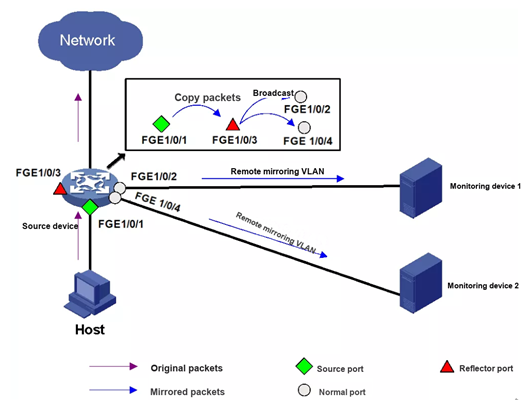
As mentioned for local port mirroring, most switches support only one destination port in a mirroring group. So how can local mirroring feed more than one destination port?
A remote mirroring VLAN does the trick, using the fact that the reflector port of the source device floods the mirrored packet inside the remote mirroring VLAN.
The implementation is to create a remote source mirroring group, a remote mirroring VLAN and a reflector port on the local device, and to add the ports that connect to monitoring devices to that VLAN. When the mirrored packet is flooded in the remote mirroring VLAN it is sent out of all those ports, so the mirrored traffic reaches several destination ports at once.
Configuration Steps
Step 1: Create remote source mirroring group 1
[Device] mirroring-group 1 remote-source
Step 2: Configure FGE1/0/1 as the source port of group 1 and mirror inbound packets
[Device] mirroring-group 1 mirroring-port fortygige 1/0/1 inbound
Step 3: Configure any unused port on the device (FGE1/0/3 in this example) as the reflector port of group 1
[Device] mirroring-group 1 reflector-port fortygige 1/0/3
This operation may delete all settings made on the interface.
Continue? [Y/N]: y
Step 4: Create VLAN 10 as the remote mirroring VLAN of group 1 and add the ports that connect the monitoring devices to VLAN 10
[Device] vlan 10
[Device-vlan10] port fortygige 1/0/2 fortygige 1/0/4
Step 5: Use VLAN 10 as the remote mirroring VLAN of group 1
[Device] mirroring-group 1 remote-probe vlan 10
Key Configuration
None