Layer 3 Remote Port Mirroring-Tunnel Mode
- 0 Followed
- 0Collected ,20Browsed

Network Topology
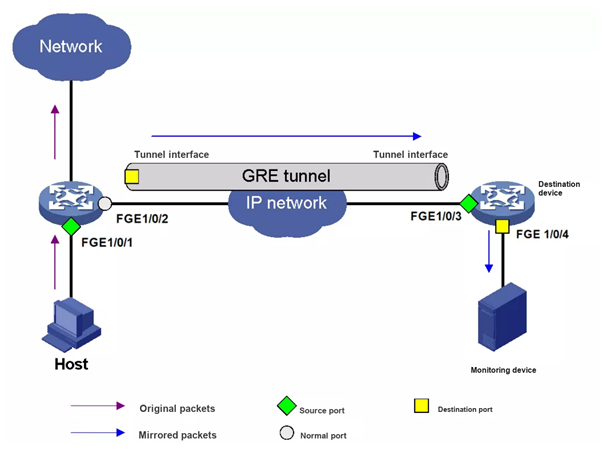
The Tunnel mode uses local mirroring groups: the source device and the destination device each have their own local mirroring group, and each group has its own mirroring source and destination. The difference is that on the source device the source port is the port to be monitored and the destination port is the Tunnel interface that carries the mirrored packets, while on the destination device the source port is the physical port corresponding to the Tunnel interface and the destination port is the port that connects to the monitoring device.
The source device copies the packets that enter the source port to the Tunnel interface — the destination port — and the packets are forwarded to the Tunnel interface on the destination device through the GRE tunnel. The destination device de-encapsulates the mirrored packets received on the physical interface corresponding to the Tunnel interface (its source port) and copies them to the destination port, which forwards them to the monitoring device.
Before configuring Layer 3 remote port mirroring in Tunnel mode, create and configure a GRE-mode Tunnel interface; if intermediate devices exist, configure a unicast routing protocol so that the source and destination devices can reach each other at Layer 3. For detailed GRE configuration, see the product configuration guide.
Configuration Steps
Configuration example — source device
Step 1: Create local mirroring group 1
[Device] mirroring-group 1 local
Step 2: Set the source port of group 1 to FGE1/0/1 and the destination port to Tunnel 0
[Device] mirroring-group 1 mirroring-port fortygige 1/0/1 inbound
[Device] mirroring-group 1 monitor-port tunnel 0
Configuration example — destination device
Step 1: Create local mirroring group 1
[Device] mirroring-group 1 local
Key Configuration
Before configuring Layer 3 remote port mirroring in Tunnel mode, create and configure a GRE-mode Tunnel interface; if intermediate devices exist, configure a unicast routing protocol so that the source and destination devices can reach each other at Layer 3. For detailed GRE configuration, see the product configuration guide.